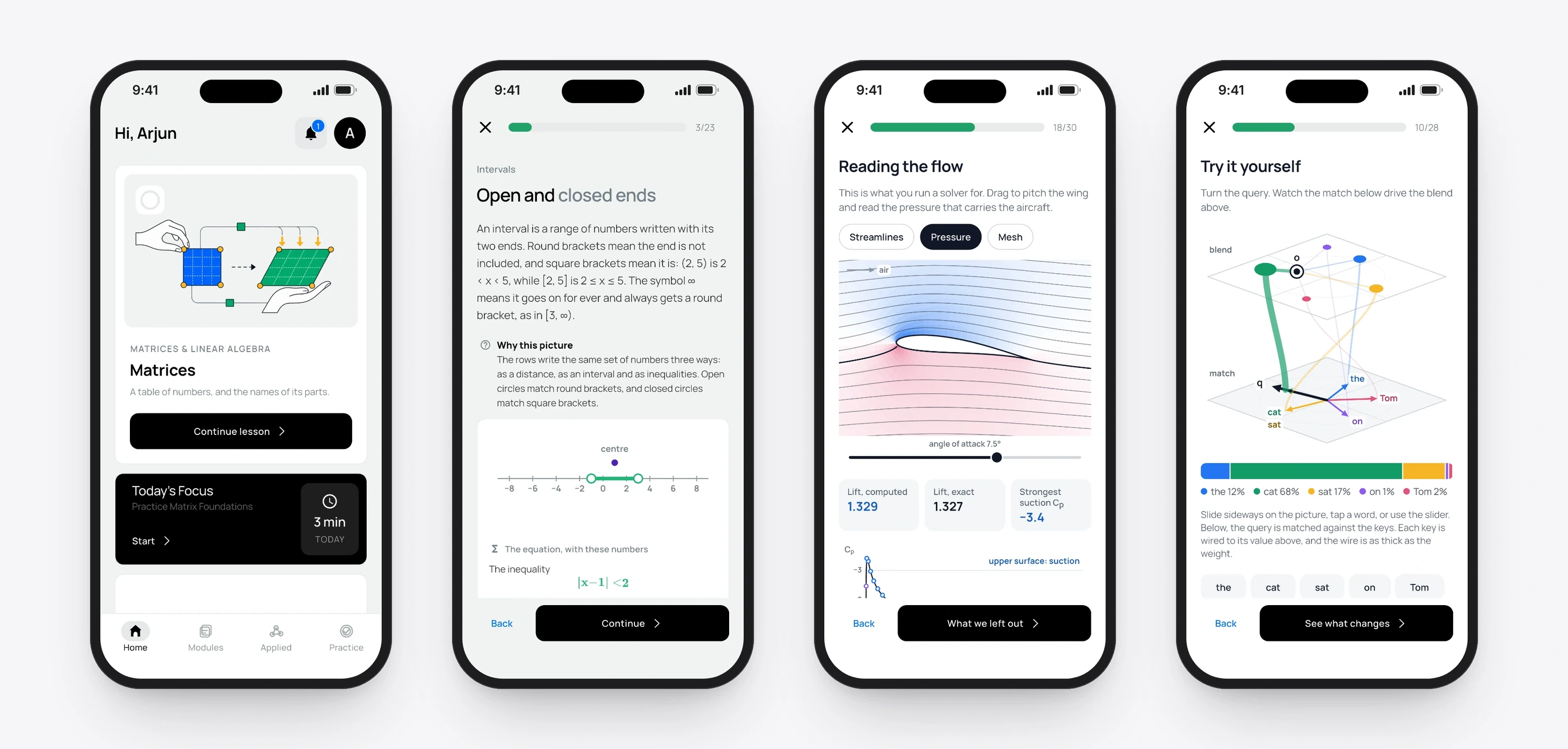
A mobile app I founded, designed and built. It teaches the maths every engineering student must pass, visually and through the student’s own branch, instead of by memorisation. It is in TestFlight, preparing for its App Store launch.
Role
Founder, designer and builder
Platform
iPhone, built in Flutter
When
August 2026 to now
Status
In TestFlight, not yet released
15
Courses
from Foundations to Mathematical Modelling
354
Concepts mapped
into one connected graph
6
Engineering branches
each with its own applications
7 steps in every lesson, enforced by automated tests.
452 commits in eleven weeks.
The problem
Every engineering student meets the same mathematics. Many memorise their way through it, and forget it when the exam is over.
I studied what students say about it in their own words, then read the learning-science research. The same story kept coming back: students can follow a worked solution, but can’t explain what the symbols mean, choose a method when the problem changes, or connect the answer to anything physical.
“I can memorise the method, but I don’t know what I am doing.”
I mapped twelve pain points, from notation that reads like a foreign language to anxiety that blanks the mind before the work begins. The research pointed to a clear response. Across 225 undergraduate STEM studies, active learning raised exam performance by about half a standard deviation. In one controlled maths trial, mixing problem types lifted delayed scores from 38% to 61%.
My role
Everything, end to end: the research, the curriculum architecture, the teaching method, the design system, the app itself, the backend, subscriptions and the release to TestFlight.
I built it with AI coding assistants, writing the specifications, teaching rules and tests they work against. That is how one designer can build a production-ready app, and it is the clearest picture of how I work when nobody draws the boundaries for me.
Five decisions
1 of 5
A lesson that always has the same shape
BeforeTextbooks start with notation, and every chapter is laid out differently, so students never know what a page wants from them.
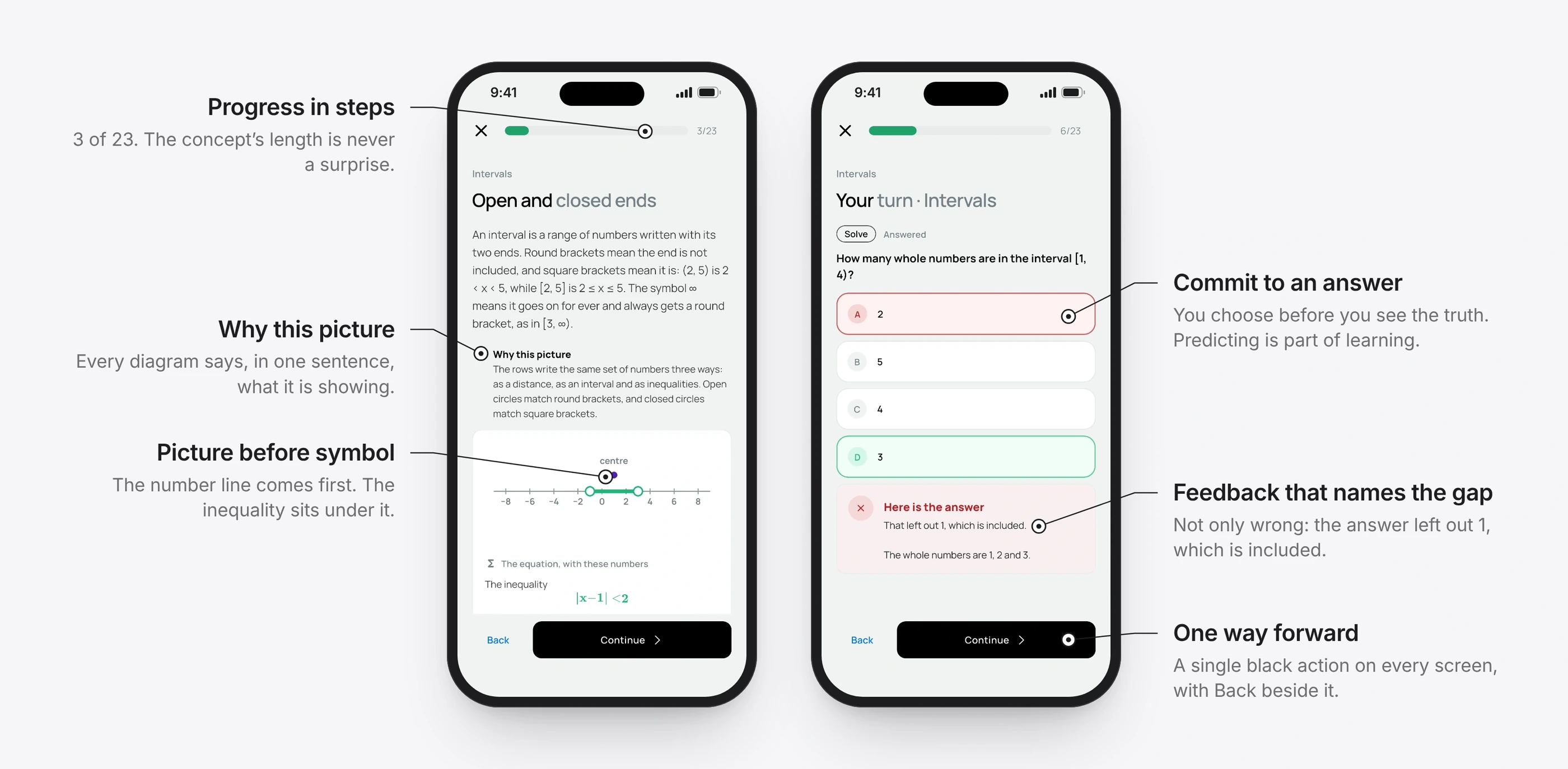
ChangeEvery concept follows the same seven steps: discover, explore, predict then check, name it, classify it, choose a method, solve. Formal notation arrives only at step four, after the learner has already used the idea. An automated test checks every authored concept against the pattern, so none can drift.
Intended outcomeA learner who finishes one concept knows exactly what the next will ask. That transfer is worth more than saving a screen.
1Discover
See the object and its name. Nothing is asked of you.
2Explore
Take control and play, with no consequences.
3Predict, then check
Commit to an answer before seeing the truth.
4Name it
Notation arrives for an idea you already use.
5Classify
Say what kind of case this is.
6Choose a method
Make the strategy explicit, and pick one.
7Solve
Work it through, one visible step at a time.
The picture comes first, the symbol under it, and every answer gets a reason.
2 of 5
One graph of maths, read through your branch
BeforeThe same maths is taught to every branch, but the examples rarely mean anything to a mechanical or electrical student.
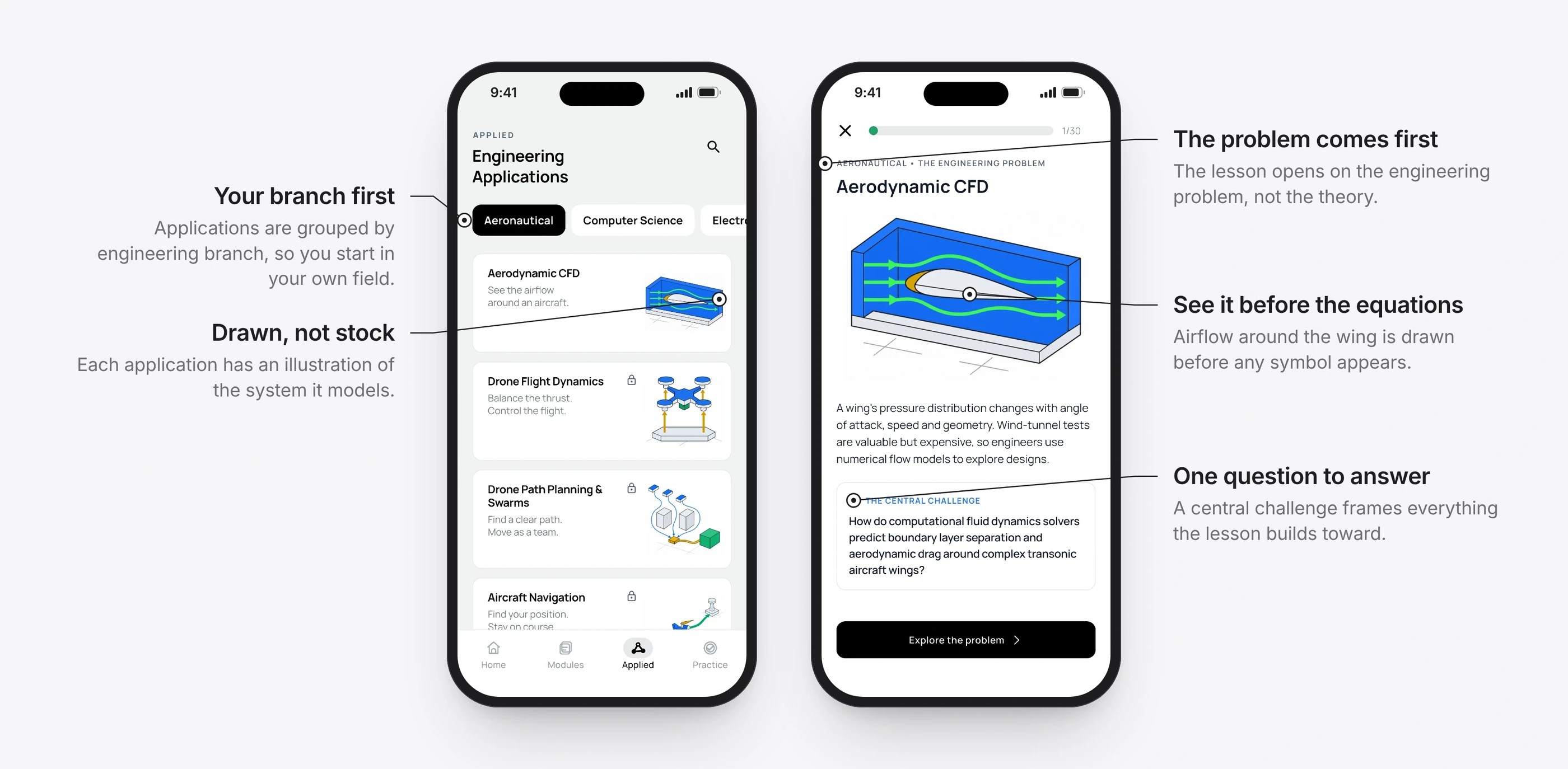
ChangeMathematics is one shared graph of modules, topics and concepts. Applications sit beside it and link back to the concepts they use. A computer science student sees graphics and machine learning, a mechanical student sees kinematics, an electrical student sees signals. The concept stays the same; the reason to learn it changes.
Intended outcomeThe question every student asks, “why am I learning this?”, is answered inside the lesson.
Learn
15 courses
Topics within each
Concepts, each with visuals, examples and practice
Apply
Real engineering problems
The model behind each one
Links back to every concept it uses
Practise
By concept, topic or course
By branch and difficulty
Exam papers and mixed sets
One shared graph. Your branch changes the applications you see, never the maths.
Pick your branch, then start from a real engineering problem.
The maths runs in front of you, one step at a time.
1 / 2
3 of 5
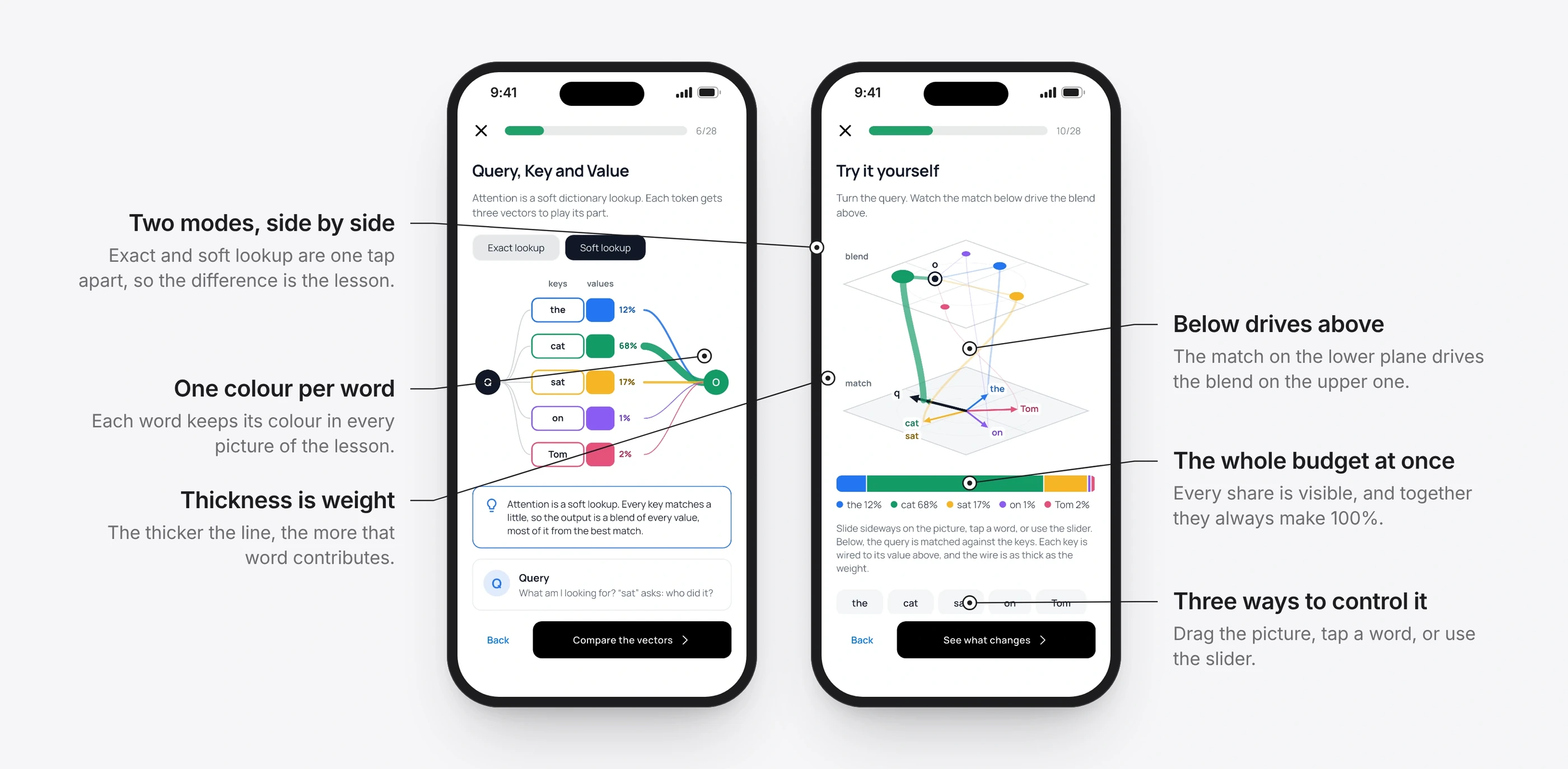
Colour that means something
BeforeHighlighting in maths material is usually decoration, so it competes with the idea instead of explaining it.
ChangeFour highlight styles, each with exactly one meaning: a soft fill for an element’s identity, a blue ring for what you selected, green for a verified answer, and a dashed outline for an unknown. The words in the explanation use the same colours as the diagram.
Intended outcomeThe sentence and the picture reinforce each other instead of competing.
Soft fillThis element has an identity
Blue ringYou selected this
GreenVerified answer
DashedUnknown, still to find
In the attention lesson, a word keeps its colour in every picture.
4 of 5
Only count what the learner can actually do
BeforeMy own audit found an early version labelling multiple-choice recognition as independent problem solving. Coverage looked complete while the evidence of learning was thin.
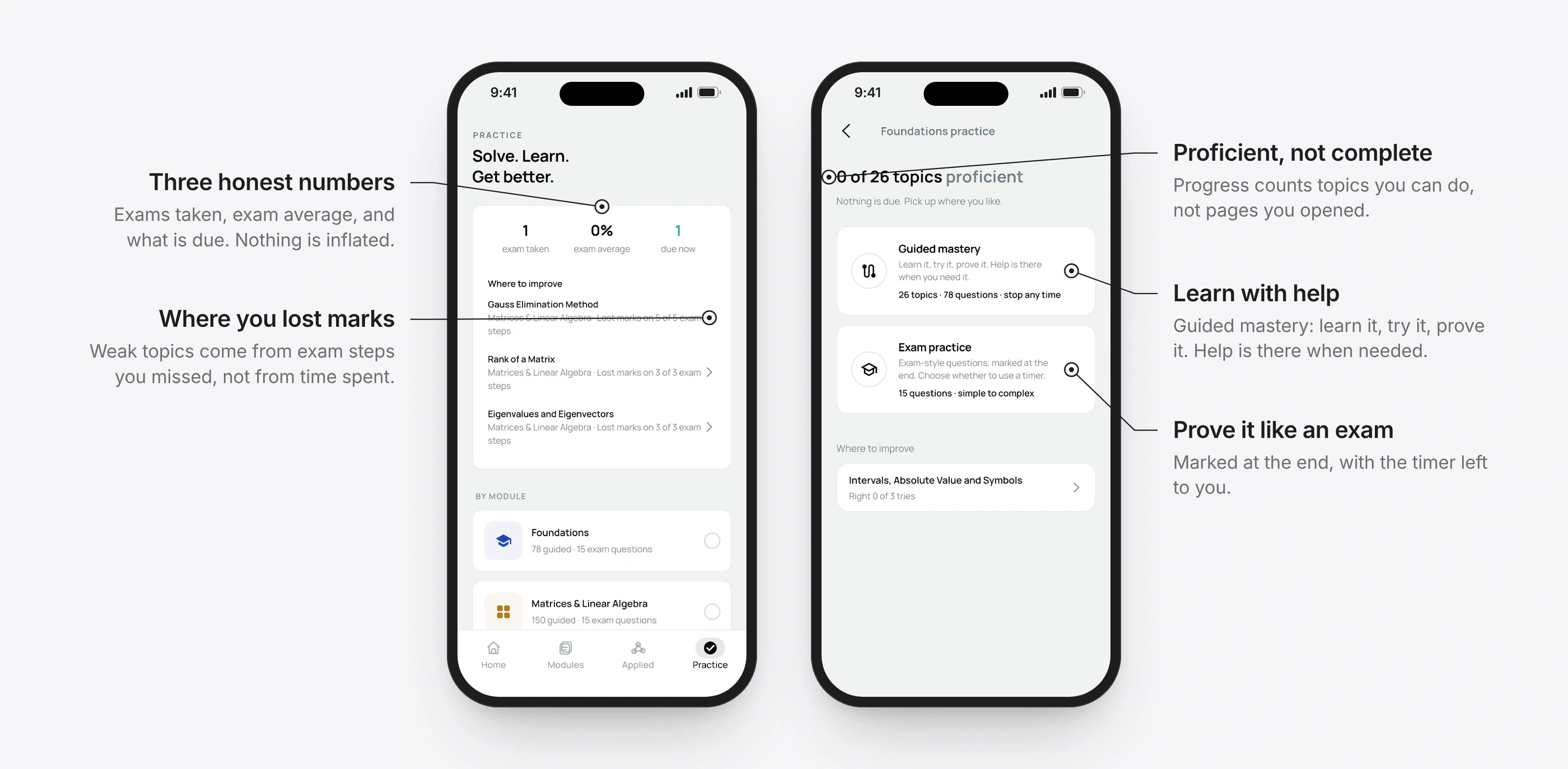
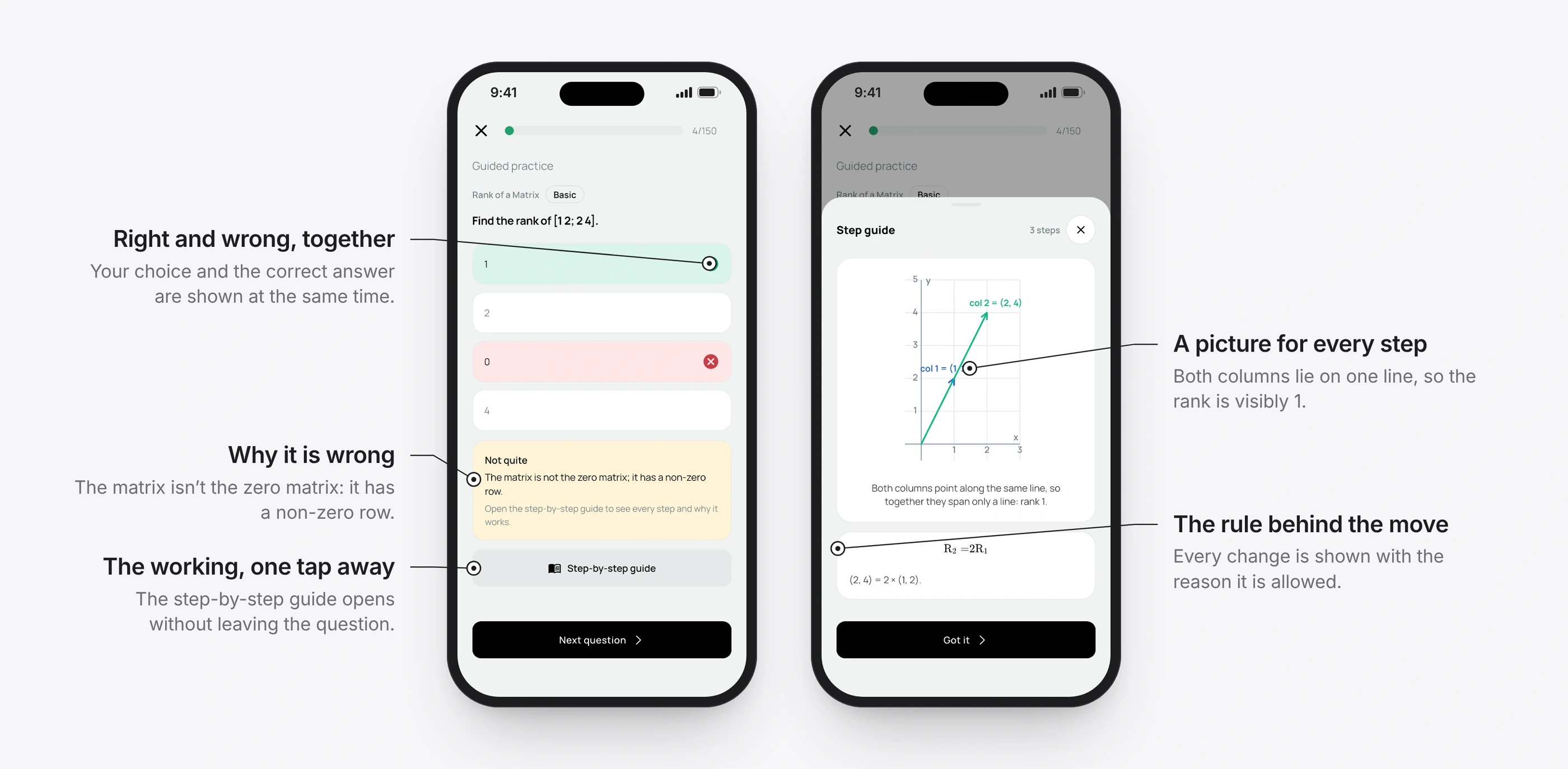
ChangePractice now has two modes. Guided mastery teaches with help on hand: learn it, try it, prove it. Exam practice is marked at the end, with the timer left to the student. Progress counts topics a student is proficient in, and weak spots come from the exam steps where marks were lost. A wrong answer shows why, and a step-by-step guide explains every change and why it is allowed.
Intended outcomeProgress means something, to the student and to the product.
Progress is counted in topics you can do, not pages you opened.
Every wrong answer comes with its reason and the full working.
1 / 2
5 of 5
Progress you can trust
BeforeStreaks and completion bars reward showing up. A student can finish every lesson and still not be able to solve a changed problem.
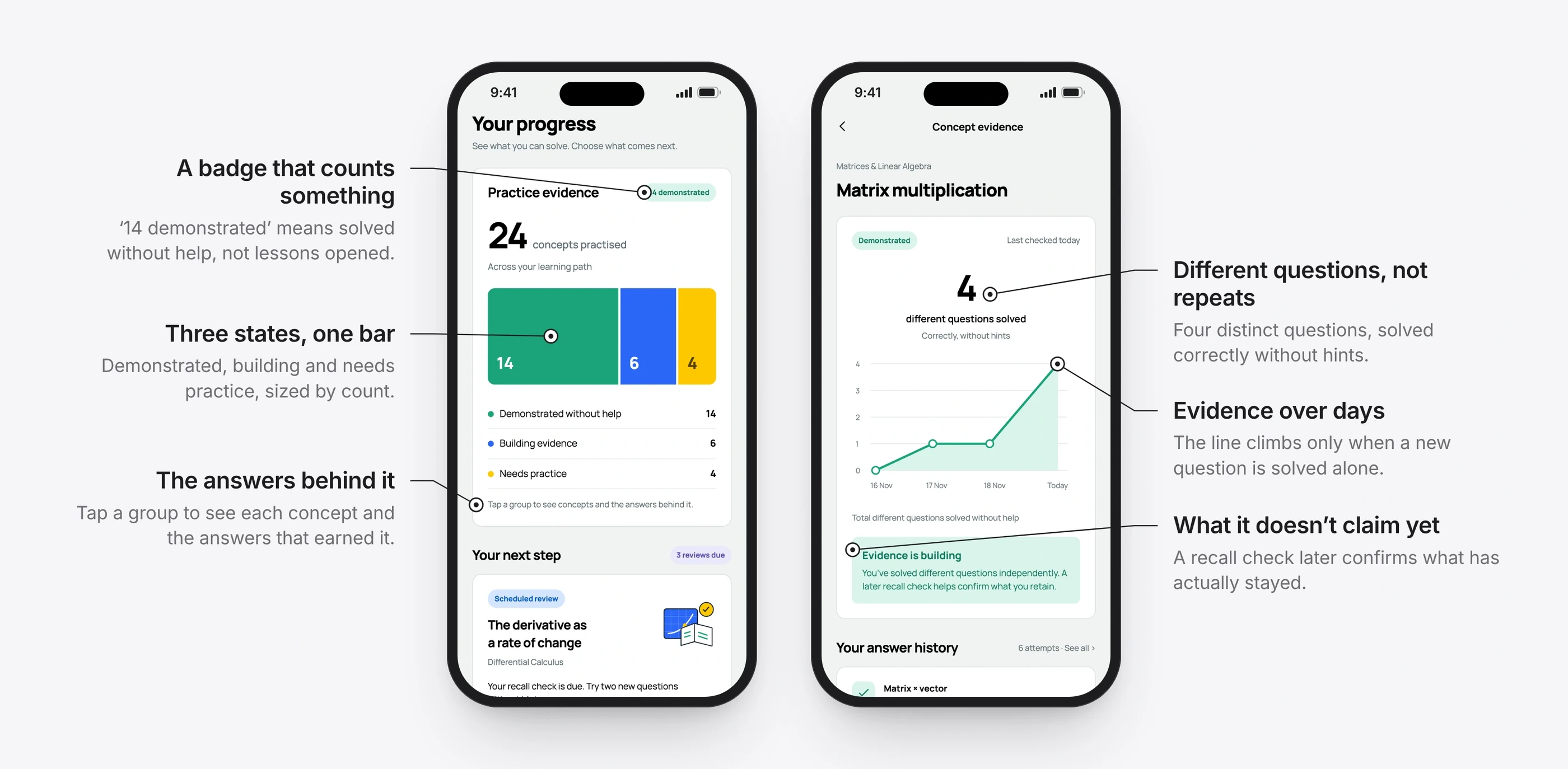
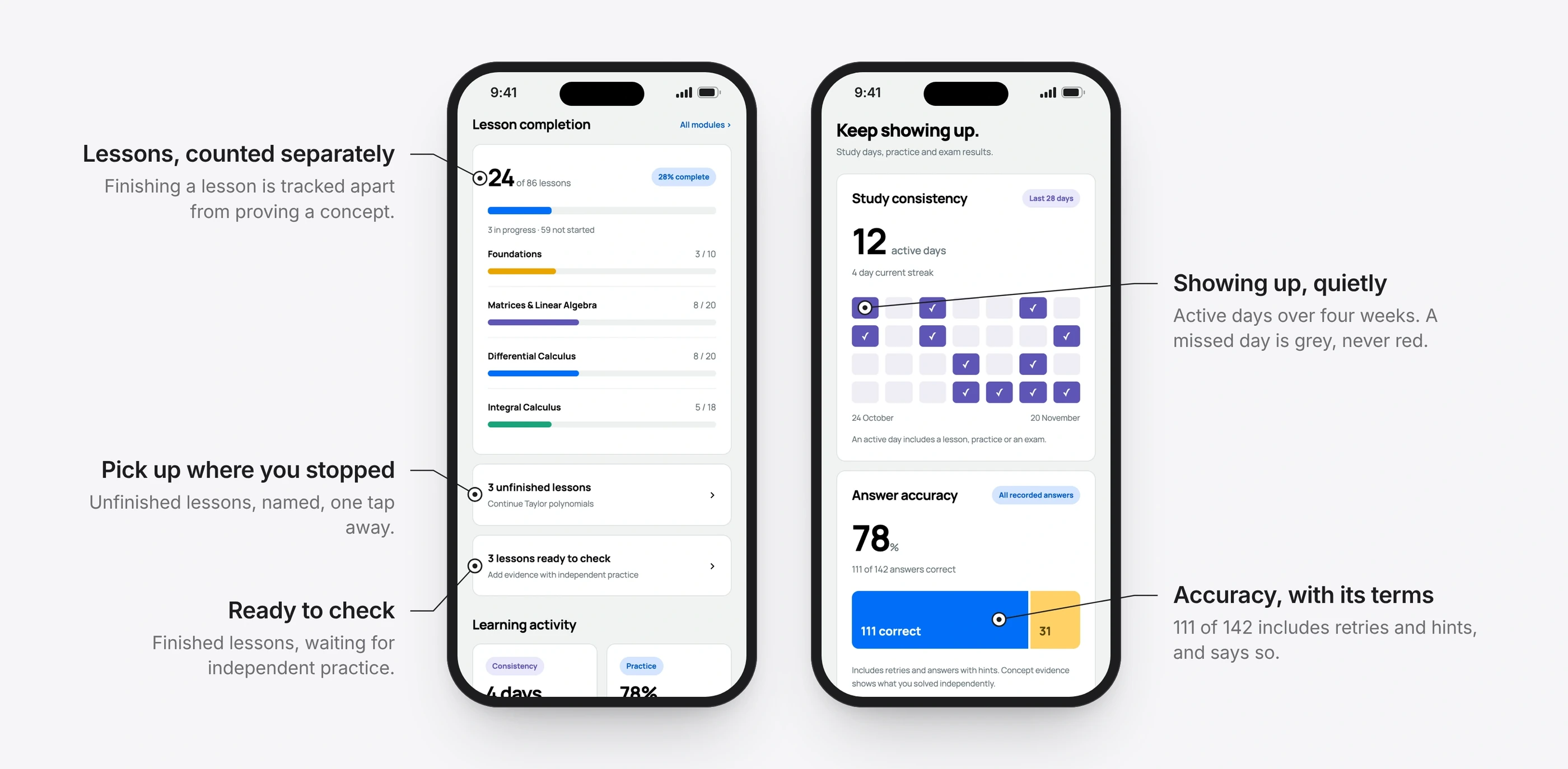
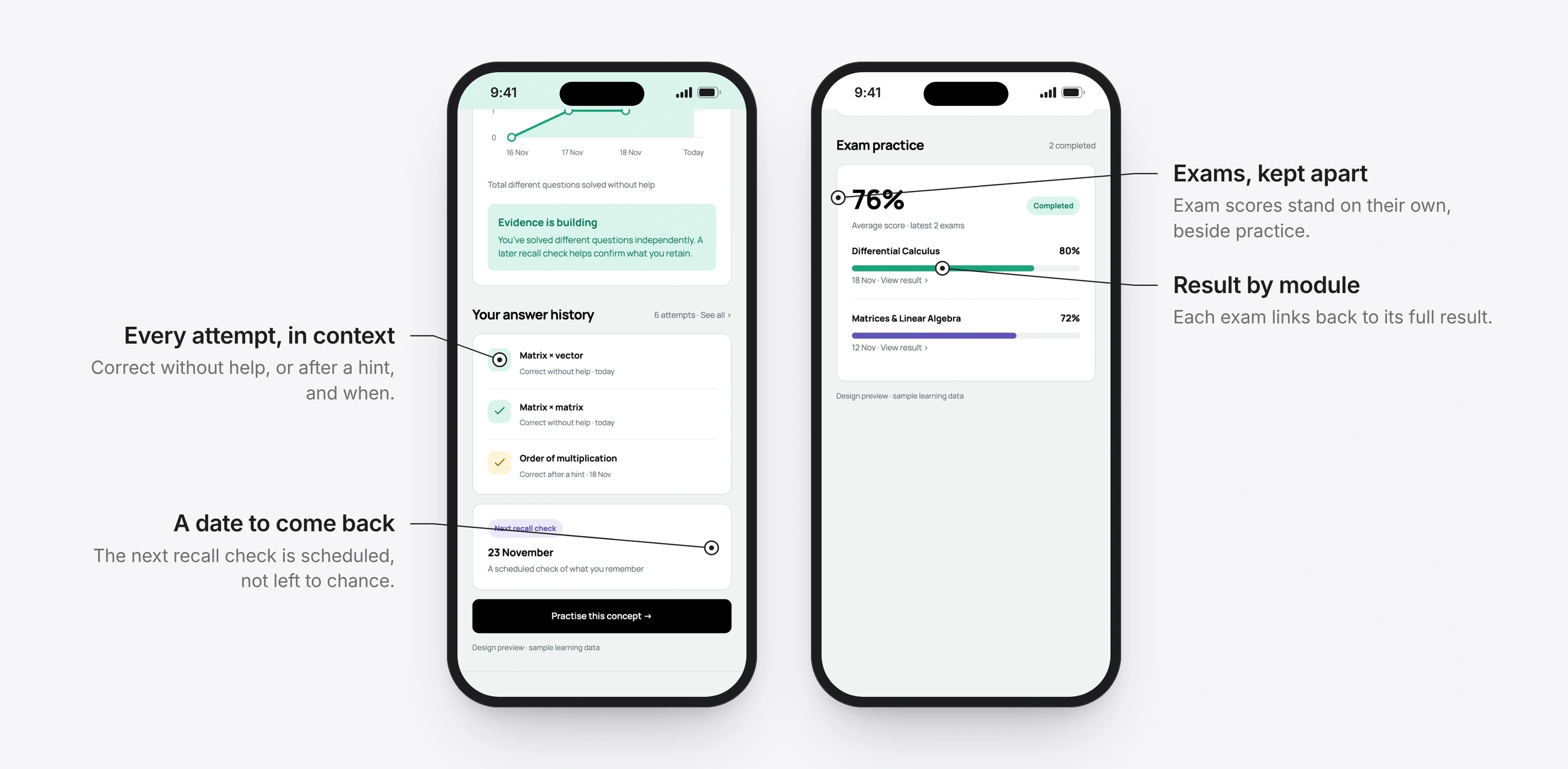
ChangeProgress is three separate things, never blended into one number. Concepts are demonstrated, building evidence or need practice, and only an unaided answer counts. Lessons finished are tracked on their own. Study days and answer accuracy sit apart again, and accuracy says that it includes retries and hints. Each concept shows how many different questions were solved alone, and books a recall check for days later.
Intended outcomeStudents can see what they can do, not only how much they have done.
Practice evidence, and the questions behind one concept.
Lessons, study days and accuracy, each counted on its own.
Every attempt in context, and a date to check it stayed. Design preview, with sample learning data.
1 / 3
Design language
A quiet reading interface with expressive engineering illustrations. A pale mineral ground, white cards, black headings and black actions carry the structure. Blue, green and yellow are reserved for explaining a topic or showing state, never for decoration. One typeface throughout, with tabular figures so numbers line up as they change.
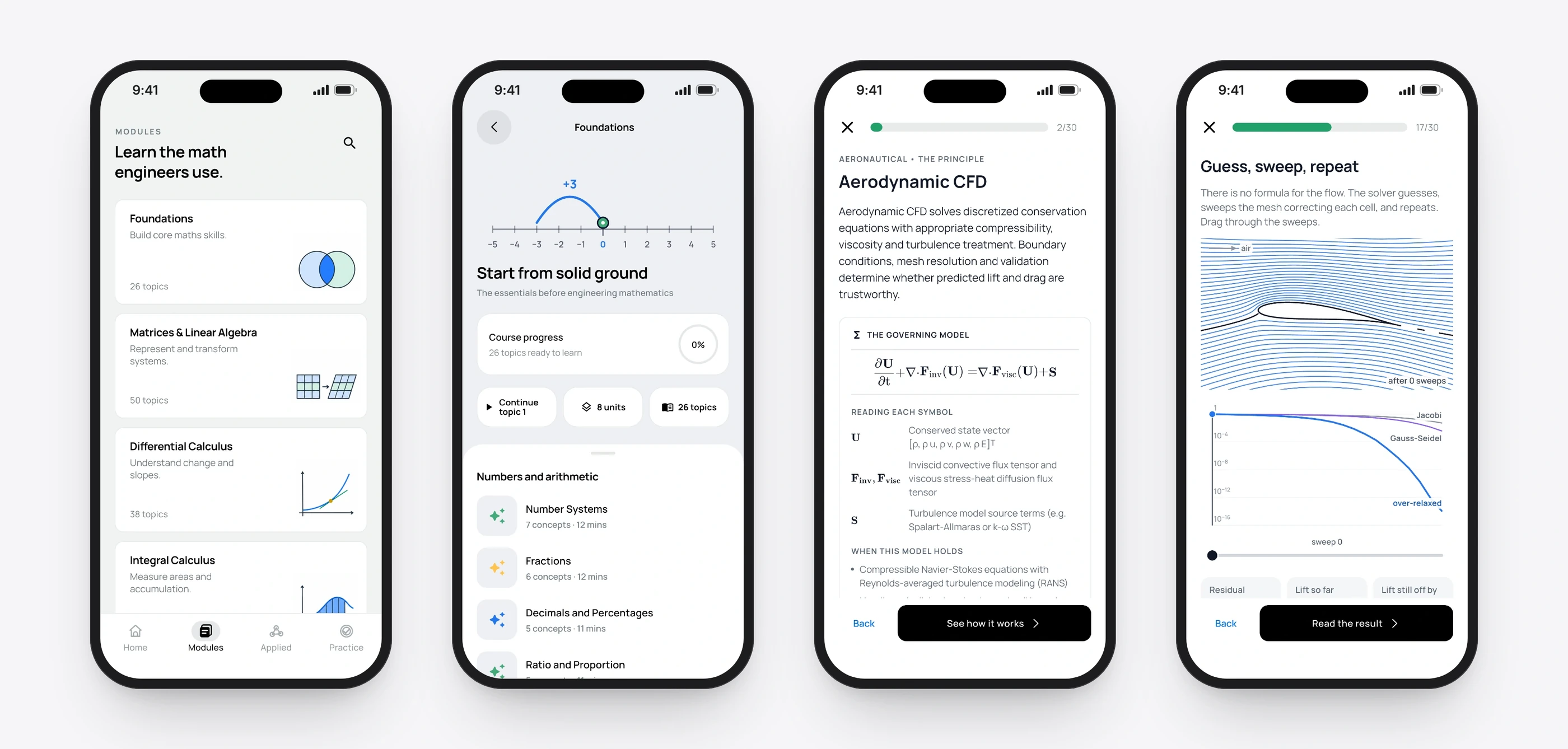
From the course catalogue to the solver behind a wing.
A sketch of the idea
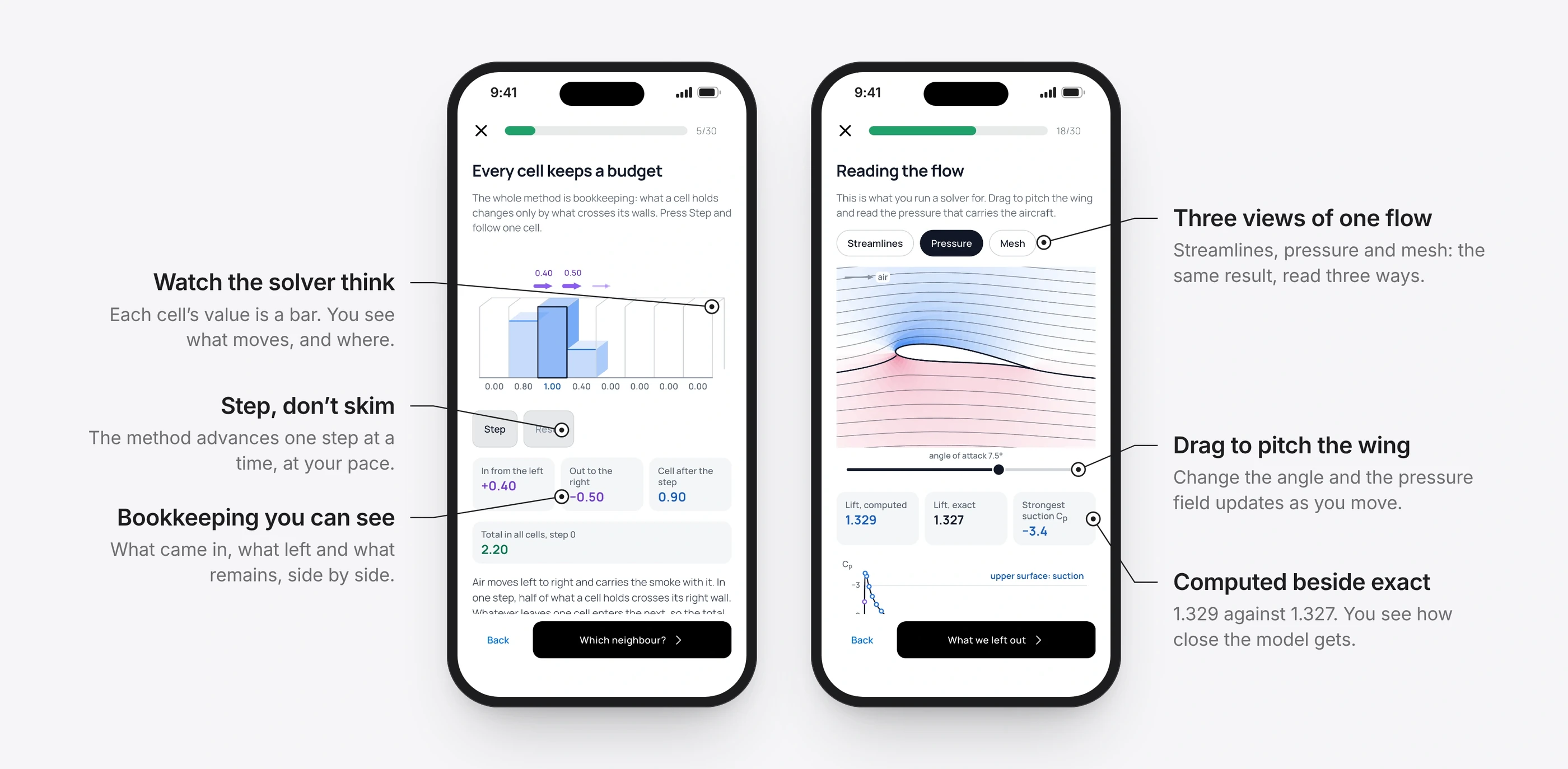
This is the flow solver from the Aerodynamic CFD lesson, ported line for line and running in your browser. It relaxes the airflow around a cambered wing on a 64 × 32 mesh that wraps the surface, then reads lift and pressure off the answer.
Blue is suction, rose is pressure.
Lift, computed
0
Lift, exact
0
Strongest suction Cp
0
Drag across the wing or use the slider to pitch it. The computed lift stays within a fraction of a percent of the exact answer.
What’s unproven
The app hasn’t launched, so there are no learning outcomes to report yet. Two gaps from my own audit are next: feedback written for every wrong answer, not only the common ones, and an open workspace where students write a solution rather than pick one.
Next is the App Store launch, then the first real measure that matters: whether students can solve a changed problem without help.